This guide provides a comprehensive overview of how to identify calendar entries in the CRM system, using colour coding for different appointment types and user assignments. Understanding this system enhances efficiency in managing viewings, inspections, and appointments, ensuring that users can quickly interpret their schedules. By familiarising yourself with these colour indicators, you can streamline your workflow and improve communication within your team.
1. The entries in the CRM calendar are identified in 2 ways.
-
By the Users specific colour
- By the colour assigned to the appointment type. Shown on the left side of the viewing record in the calendar

2. Viewings - Sales or Lettings - Shows with a light blue bar

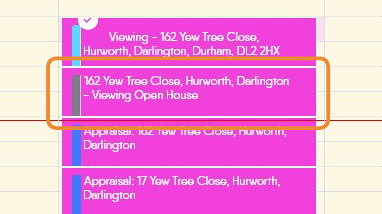
3. Open House Viewing - Sales or Lettings - Shows with a grey bar
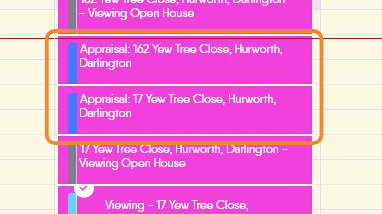
4. Appraisal - Sales or Lettings - Shows with a blue bar
5. Check In Inspection -Lettings - shows with a green bar

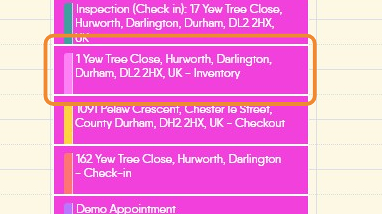
6. Inventory - Lettings - shows with a pink bar
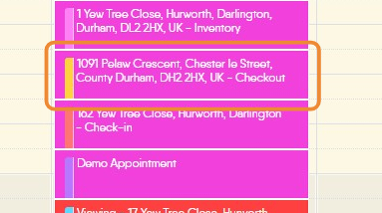
7. Check Out Inspection - Lettings - shows with a yellow bar
8. Check - In (Inspection) - Lettings - shows with an orange bar
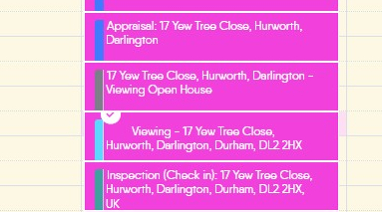
9. Appointment - Sales or Lettings - shows with a purple bar

10. Un Confirmed Viewing - Sales or Lettings - will show as red with a light blue bar. Once confirmed the viewing will change to the colour of the person assigned the viewing.
