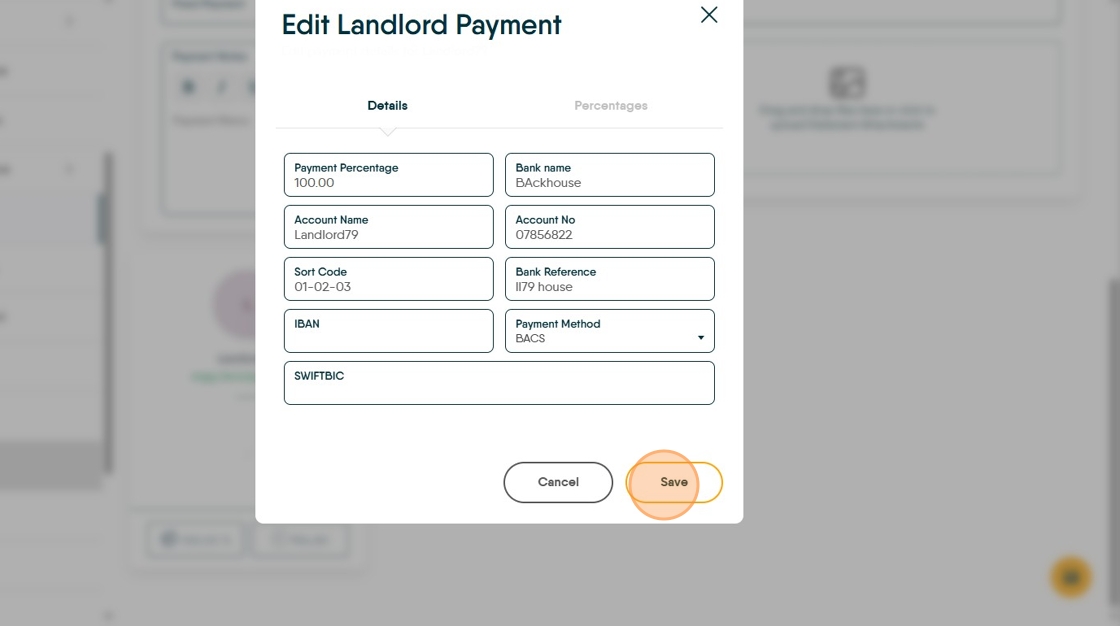
This guide provides a straightforward approach to adding the bank details to a Landlord record so BACS can be used successfully.
Alert: Alert! To use BACS you need to know, the bank account information for a Landlord MUST be added, otherwise the BACS upload will fail. This is the same for Tenants and Contractors that you may pay by BACS.
Adding Payment Details to a Landlord Record.
1. Navigate to the Property Record.

2. Click "Payment"

3. From this screen, you can set a number of options.
Payment Due allows a date to be set that the landlord is paid each month, this is noted in perform payments and can be sorted before payments.
'Maintain Float' allows a float to be set and maintained at that level, automatically topped up from the property balance before payment is made to the Landlord.
'Fixed Payment' allows a fixed monthly payment to be made to the Landlord, this could be a fixed agreed monthly payment to guarantee a rent or an agreement to pay the Landlord a fixed sum and 'save' the remainder.
'Payment Note' is a note that will show when you 'Perform Payments' to act as a reminder.

4. Click here.

5. Click "Edit"

6. Complete all of the fields. IBAN and SWIFTBIC are not required for UK payments

7. Click "Save"