This guide provides a straightforward process for charging maintenance expenses to a landlord and editing contractor commission rates in your expense management system. By following these steps, users can efficiently adjust commission rates, which is crucial for maintaining proper budget allocations.
Tip: Contractor commissions are charged to the Contractor and paid to the Agent ledger when the contractor is paid. i.e. it reduces the payment to the Contractor.
Uplifts are charged to the Landlord and paid to the Agent ledger when Perform Payments is run.
1. Navigate to https://crm.iamproperty.com/Dashboards/Accounts
Click here.
Click "Jobs Outstanding"

Tip: The jobs in 'Jobs Outstanding' are first created in Property Management. When the job is marked as completed by the person managing the maintenance tasks, they are added to Jobs Outstanding list. This is the best way to create an expense.
It is possible to create a new Expense by clicking the + in the Expenses tile or in the Jobs Outstanding menu.
For this guide we will use jobs created in Property Management.
2. Using the 3-dot menu. Click "Edit"


3. All the key data is in the job record, all that is required is to click "Select expense category" and then select the appropriate option from the list.
4. Click "Payment"

5. This screen is where the Landlord Invoice for the work is created. Click "Create Invoice".
If the job has been completed in Property Management correctly then all the costings etc will be in this screen. If not then complete all the mandatory fields, i.e. those with a red star.
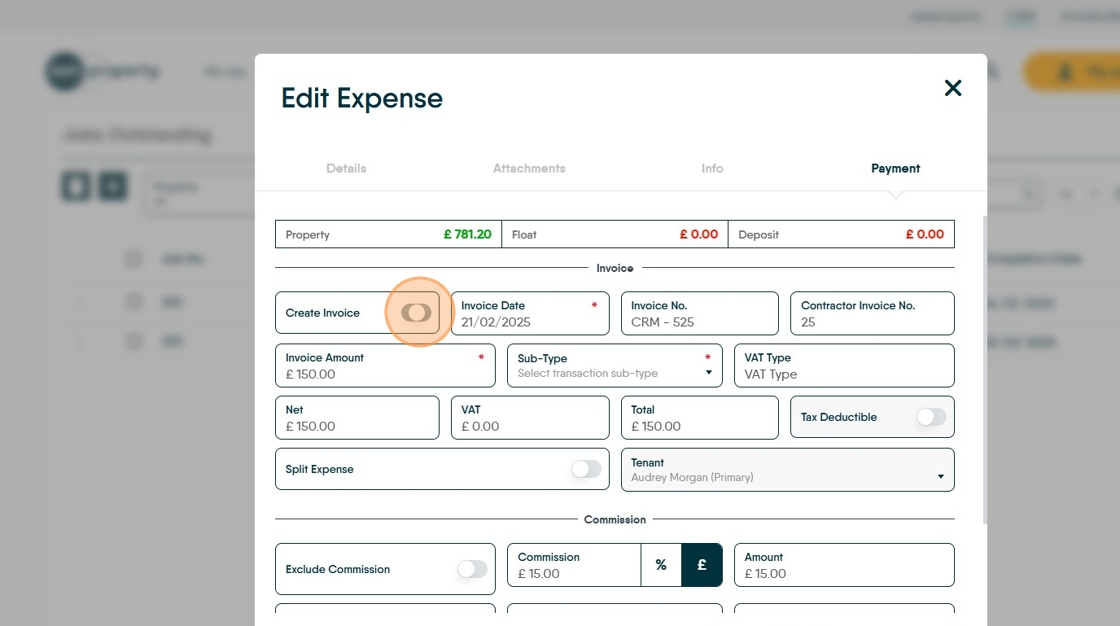
6. Click "Select transaction sub-type"

7. If the job cost is to be split between the Landlord and the Tenant click the "Split Expense" toggle and then set the percentage split.

At this point 'Save' or 'Save and Pay Now' can be selected and the charge made to the Landlord.
Edit Contractor Commission or add Landlord Uplift
Alert: Alert! you cannot charge an uplift and a commission, the CRM will not allow this, it is one or the other.
8. If you need to charge or edit a contractor commission or add an uplift to the Landlord, this is done from the 'Commission' section.
Click this text field to change the value of the commission or add a new contractor commission. If already set (in Contractor record ) commission can be disabled by clicking the Exclude Commission toggle ON.

9. In the example shown above the Contractor will be charged £15 which is deducted from their payment and added to the (your) Agent Ledger.
10. To add an 'Uplift' or charge to the Landlord, click here.

11. Click the "Uplift To" field and add the total amount you are charging the Landlord. N.B. this is the contractor charge plus your uplift. So if the contractor charges £100 and your uplift is £20 type £120 into the 'Uplift To' field.
The uplift is charged to the Landlord and paid into the (your) Agent Ledger.
