This guide provides essential instructions for effectively removing a property from online marketing portals within the CRM system, ensuring that listings are accurately managed and up-to-date. By following these steps, users can maintain control over their property marketing, preventing outdated or unwanted listings from being displayed. This is crucial for improving the overall quality and relevance of property offerings, ultimately enhancing client satisfaction and operational efficiency.
1. Navigate to https://crm.iamproperty.com/myday Then go to the property you want to remove from the property portals.
2. Click "Portals"

3. Click onto the 'Bin' icon for the portal you are removing the property from, then upload to remove the property from the portal immediately or wait till a bulk upload is done for removal.
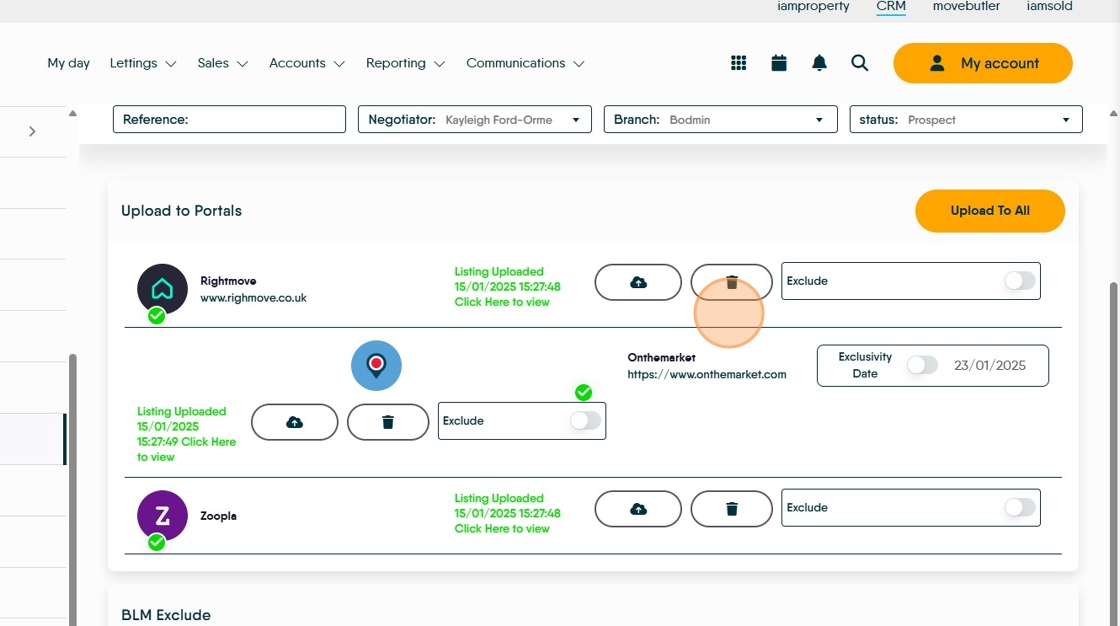
4. Click here to Save.

5. Click "Marketing"

6. Click this checkbox to turn off the Advertise option this will lock the Portals tab and stop the property being re-uploaded to the Portals. If you are only removing a property from some of the Portals you upload to leave 'Advertise?' selected.

7. Click save to save the change.
