It you are not using the Mass MOS option in CRM, the process detailed below is how you will send an MOS letter to each individual recipient that needs to be sent the MOS.
1. Navigate to the Property and Offer you are sending the MOS for.

2. Click here , the Generate Letter option

3. Click "Please select a letter"

4. select your letter from the drop down menu

5. Click "Generate"

6. Check the the details of the Vendor and Applicant are correct. Click "Generate"

7. Click "Send Email". If you want to check the letter before sending click on the 'View Merged Data' icon

8. Select who you are sending the letter to from the contacts list. For example, Click "Sales Applicant"


9. Click "Select a Template" if you have templates created they will show in the drop down menu, select the appropriate template.
Click "Memo of Sale Email"
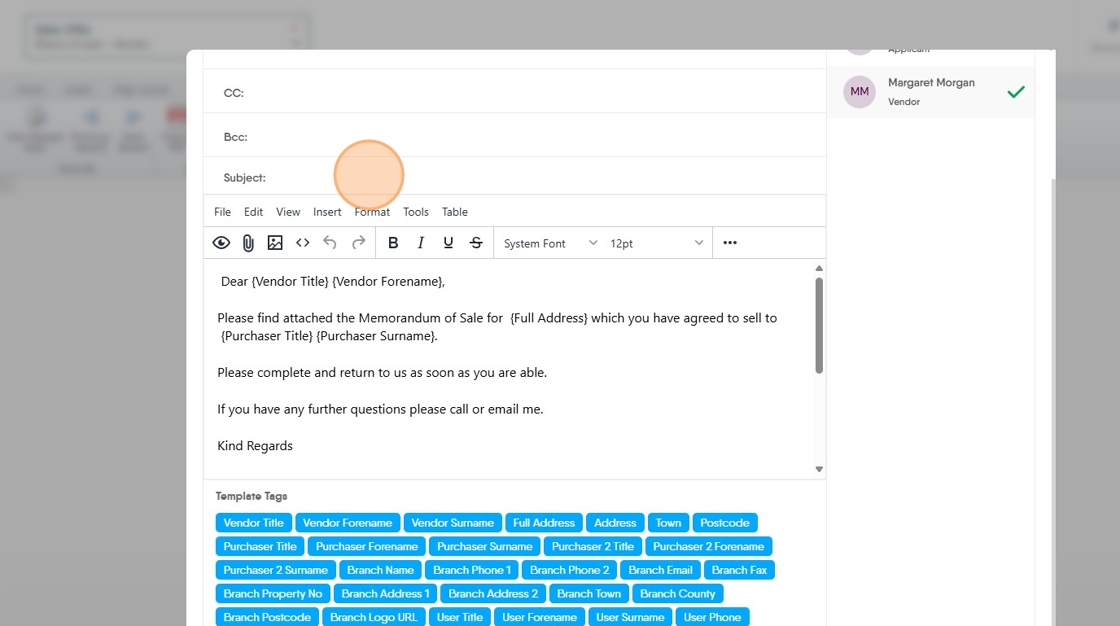
10. Click the "Subject:" field and add the subject of the email.
11. Click "Send Email"

12. Repeat this to send the MOS to all other recipients
13. Click "Memo of Sale - Purchaser"

14. Click "Memo of sale - Vendor"
