Giving a comprehensive walkthrough of the client portals within the iamproperty CRM, making it an essential resource for users looking to enhance their Clients property management experience.
Tenant Portal
1. Click "Sign In"

2. The first screen is the News feed for Tenants

3. Click "Property Management". The tenant can see all the currently in progress maintenance on the property. They can also raise new maintenance tasks from here, by clicking on the 'Create Job' option.


4. Click "Property Information" this tile will show the Tenant all the information added to the Information screen in the property record.
Click the "Stopcock Location" field.
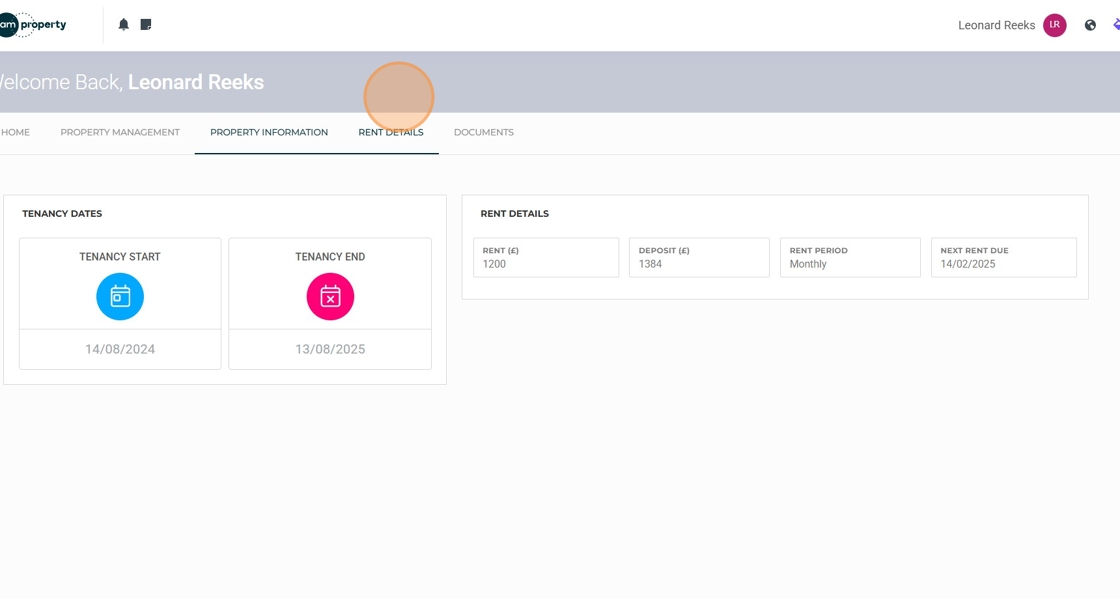
5. Click "Rent Details" this will show all the details about the rent, including the start and end dates of the tenancy.
6. Click "Documents" this will show all documents that have been uploaded to the property record or the tenant/tenancy and relate to the tenant.

Log Out

7. Click name in top right corner
Click "Log out"