This guide provides a step-by-step approach to generating Compliance Reports, helping to show dates for compliance checks in an easy to use format. By following the process below, users can efficiently create comprehensive compliance reports and streamline the process of sending necessary information to contractors. Additionally, the guide highlights automation options that can save time and reduce manual workload, ensuring timely compliance management.
1. Navigate to https://crm.iamproperty.com/MyDay
Tip: Tip! There are a few ways to create Compliance Reports the most straightforward is via the Reporting menu.
2. Click "Reporting"

3. Click "Reports"

4. Click "Lettings"

5. Click here.

6. Type the name of the report you are looking for e.g. Gas.
7. Click "Standard Gas Safety Checks Due" or the name of the report you want to create.

8. Click the "Number of Days" field. This sets how many days in the future the report will show e.g. 30 days will show checks due within the next 30 days.
n.b. This report will allow you to run a report on all Compliance checks at the same time.

9. Click "All Safety Checks" and select the Safety Check from the drop down menu.

10. in this case we click "Gas Safety"

11. Click "Run Report"
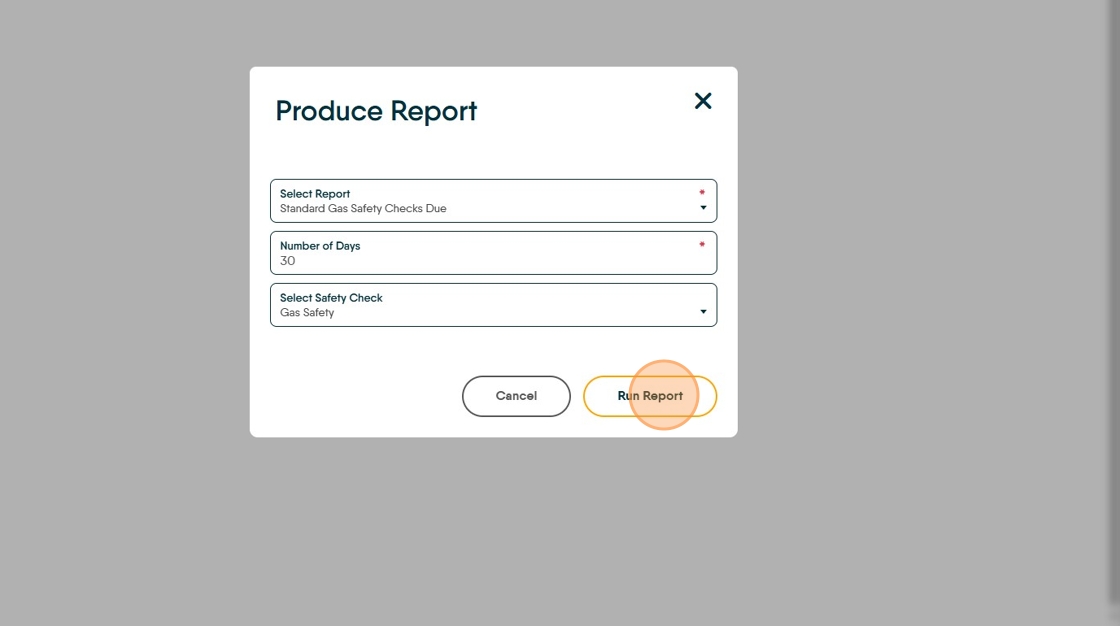
12. Click "Run Report" we can ignore this 'Specify Report Ordering' screen

13. Once the report has compiled. Click "Export" and select the file type (we suggest either Excel if you want to edit or PDF)

14. or Click "Print" to print the document.

Creating a Compliance Report from the Activity List
15. Click "Lettings"

16. Click "Lettings dashboard"

Alert: Alert! A compliance record will only show in the Activity List if it is; Enabled and there are records to show within the date range. To edit these click the cog icon.
17. Click "Gas Safety Due" or any of the other Compliance reports.

18. Click this checkbox to select all of the records displayed.

19. Click here to export the list to a CSV file. This can be emailed to your contractor.

Tip: Tip! Collating and sending Compliance information to contractors can be automated. This means that a contractor can be sent details of and Compliance items, as required without any interaction from you.