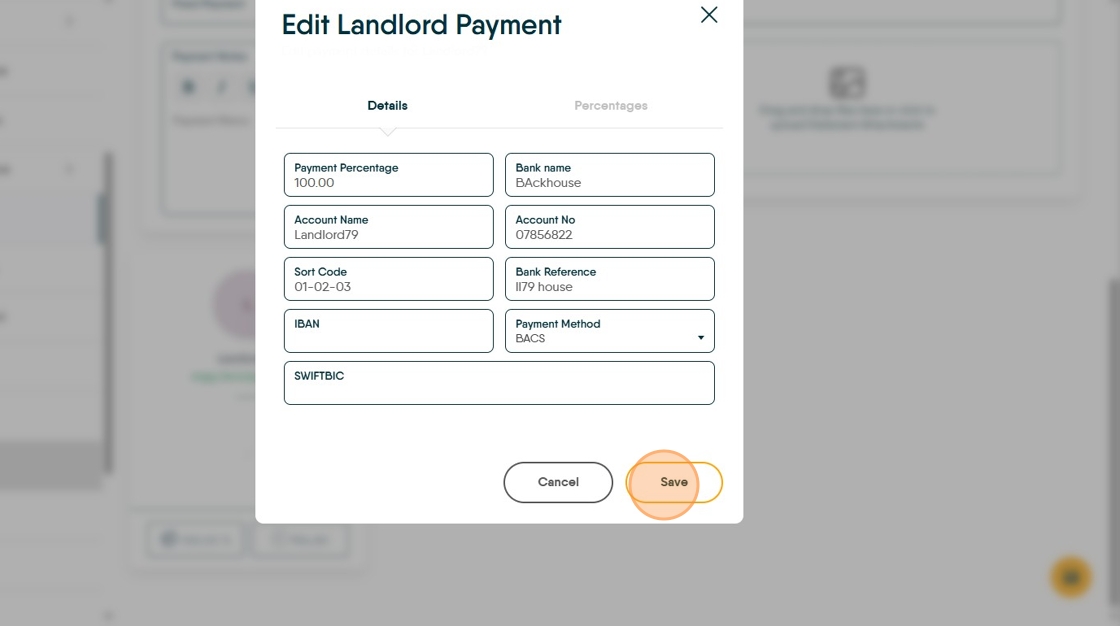
This guide provides a straightforward approach to adding the bank details to a Landlord record so BACS can be used successfully.
Alert: Alert! To use BACS you need to know the bank account information for a Landlord and it MUST be added to CRM, otherwise the BACS upload will fail. This is the same for Tenants and Contractors that you may pay by BACS.
Adding Payment Details to a Landlord Record.
1. Navigate to the Property Record.

2. Click "Payment"

3. From this screen, you can set a number of options.
Payment Due allows a date to be set that the landlord is paid each month this is noted in perform payments and can be sorted before payments.
'Maintain Float' allows a float to be set and maintained at that level, automatically topped up from the property balance before payment is made to the Landlord.
'Fixed Payment' allows a fixed monthly payment to be made to the Landlord, this could be a fixed agreed monthly payment to guarantee a rent or an agreement to pay the Landlord a fixed sum and 'save' the remainder.
'Payment Note' is a note that will show when you 'Perform Payments' to act as a reminder.

4. Click here.

5. Click "Edit"

6. Complete all of the fields. IBAN and SWIFTBIC are not required for UK payments

7. Click "Save"